Key Points
- Automatic citation imports carry typical error rates of 10 to 20 percent.
- Zotero now works fully in the browser with an account plus extension.
- Chicago 18th edition still requires manual checks of titles and page numbers.
Introduction: The Accuracy Problem Every Social Science Grad Student Hits
A graduate writer in r/GradSchool, nearly 50 and working in Word, tested the free online reference generators. MyBib came closest to Chicago 18th edition, and even its output still needed correcting against the manual. Their university's own generator did worse.
That gap is the problem. An automatic import saves seconds and charges them back at proofreading, and the bill comes due at dissertation scale rather than article scale.
A reference manager that switches styles with a button and a web form that pastes a formatted entry look alike on day one and diverge by the fourth chapter.
Did You Know?
No citation tool removes the need to check your references; the right one simply cuts down how often you have to correct them. Treat every automatically generated citation, whether from a reference manager, a web generator, or Google Scholar's Cite button, as a first draft, and confirm titles, capitalization, and page numbers against the APA or Chicago manual before submitting.
Zotero vs. EndNote vs. Mendeley for Dissertation-Scale Libraries
For social science dissertation libraries, the real comparison often begins after institutional access ends, when free storage and upgrade costs diverge. Zotero pairs unlimited local storage on your own computer with tiered cloud sync, while EndNote offers a one-time license and Mendeley charges a low monthly subscription. Zotero also offers Word and browser integration, including a fully web-based account option, which matters for students who want to avoid desktop-only workflows.
| Zotero | EndNote | Mendeley |
|---|---|---|
| Free account with 300 MB cloud storage; paid tiers at $20 per year for 2 GB, $60 per year for 6 GB, or $120 per year for unlimited cloud storage. | $275 one-time purchase; $150 one-time purchase for eligible students. | $4.99 per month or $55 per year. |
| 300 MB free cloud sync; local storage on your own computer is not capped. | Not identified as a separate free individual tier; EndNote site-license information advertises unlimited storage. | Not identified in the available pricing result. |
| $20 per year for 2 GB, $60 per year for 6 GB, or $120 per year for unlimited storage. | No separate paid storage plan identified in these sources. | Not identified in the available pricing result; subscription cost does not specify storage tiers. |
| No additional fees are charged for collaboration; group file storage draws from the group owner's storage account. | Up to 1,000 collaborators. | Not identified in the available pricing result. |
| Integrates with Word and browsers; fully web-based account option with browser extension, no desktop installation needed. | Not identified in the current pricing and site-license sources reviewed. | Not identified in the current pricing result reviewed. |
- Storage, Zotero
- EndNote Site License, EndNote
- Mendeley | Pricing, Mendeley
- Buy EndNote - The best reference management tool, EndNote
- Individual File Storage, Zotero
- EndNote - Your choice for reference management, Alfasoft
- Is there any management or administrative functionality for Zotero Lab and Institution subscriptions?, Zotero
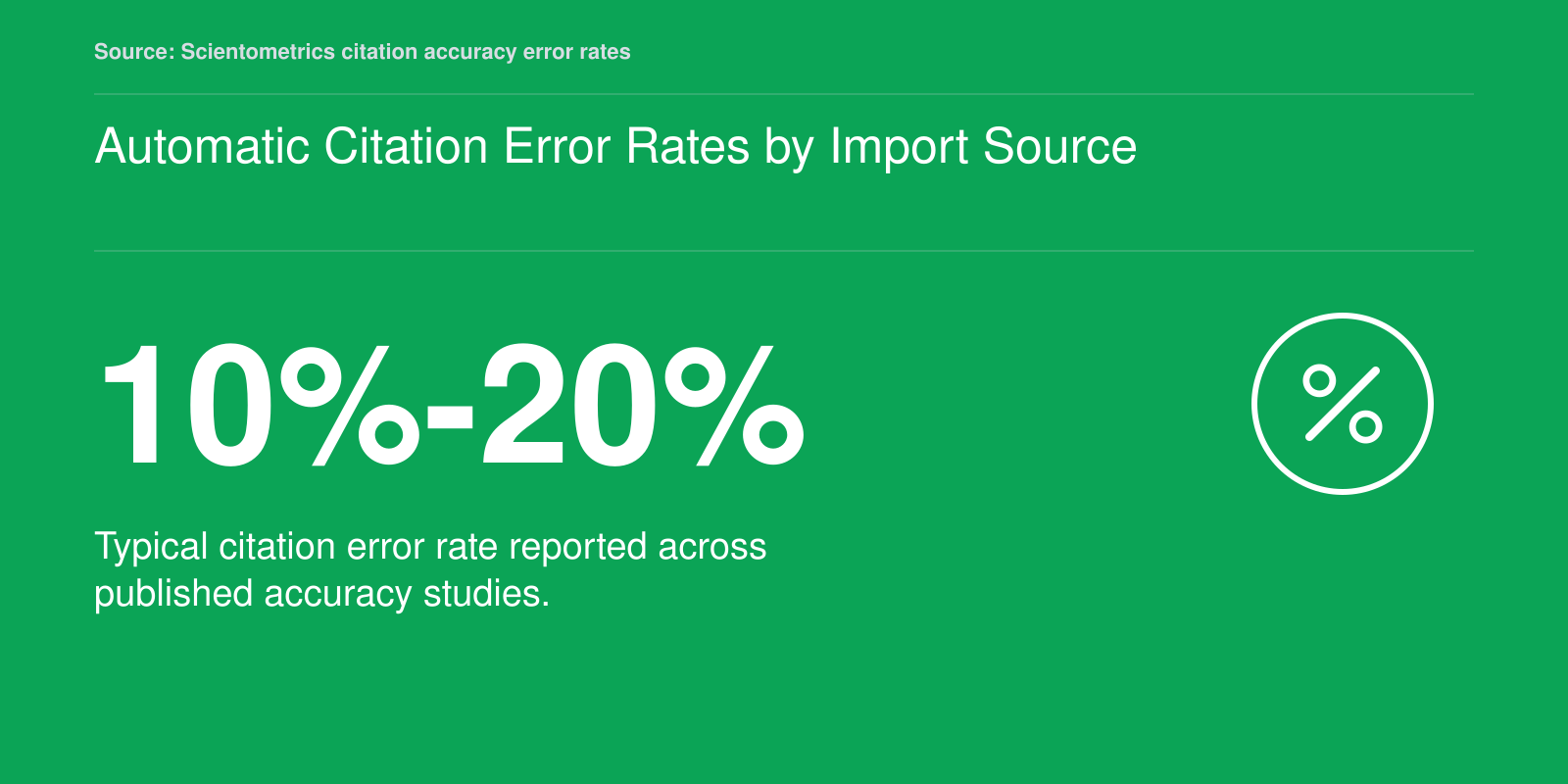
Automatic Citation Error Rates by Import Source
Published citation-accuracy studies consistently report typical error rates of 10%-20%, with a broader range of 5%-40% across individual studies. For a 34-reference social-science article, that works out to roughly 3-6 erroneous citations before manual checking. Every automatic import source still requires manual verification.
- Zotero Manual: Adding Items (PDF Metadata Retrieval), Zotero Manual (GitHub)
- Evaluation of Scientific PDF Metadata Extraction Accuracy, Semantic Scholar
- Scientometrics: Citation Accuracy Error Rates, Springer
APA 7, Chicago 18, and Journal Submission: Style Handling Across Tools
A generic "Chicago" option in a dropdown is not the same thing as a journal's actual house style. In the social sciences you will most often need APA 7 author-date (psychology, education, criminology) or Chicago 18, and Chicago itself splits into author-date and notes-bibliography. Picking the wrong variant gives you a document with the right punctuation and the wrong architecture.
How Zotero and EndNote Differ Structurally
Zotero builds its output from open Citation Style Language files, and its integration with Word, LibreOffice, and Google Docs is dynamic: citations stay live and you can switch style with a click, including between Chicago author-date and notes-bibliography. Zotero's Chicago 18 support arrived in 20261, but the changelog records post-upgrade fixes, so access dates, DOIs and URLs, shortened notes, and translated or government sources still deserve a look.
EndNote's advantage is the depth of its journal-specific style files, which can encode a publisher's own et al. thresholds, capitalization, and DOI formatting. The catch is that those files are separate downloads tied to a version, and a journal style is not the same as the generic APA 7 or Chicago style you tested in.
Match the Tool to the Submission Route
- Microsoft Word: the standard for nearly every social science publisher and submission portal. Both Zotero and EndNote integrate here.
- Google Docs: workable with Zotero, but only with the desktop app, the browser connector (Chrome, Firefox, Edge, or Safari)2, and Docs permission granted. Moving a live Word file directly into Docs can break citations; use Zotero's switch-processor step instead.
- Overleaf: no native plugin for either manager. You export a.bib file and compile with BibTeX, which means giving up dynamic updating.
Test Before You Submit
Build a two-page sample with a book, a journal article, a dataset, and a web page, then check each entry against the journal's author guidelines and the style manual. Confirm the edition and variant in the style name, not just the label. Unlinking citations produces plain text and ends style switching, so keep that as a final step after acceptance.
- Zotero 7.0 Changelog, GitHub (Zotero Project)
- Zotero Troubleshooting Guide, Humboldt State University Library
Building a Collaborative Bibliography Without Losing Your Library
How do you share a bibliography with coauthors without wrecking your own library in the process? This is where reference managers separate themselves most sharply from web generators, and where a bad setup costs more time than it saves.
Group Libraries Versus Attachment Limits
Zotero and Mendeley both support group libraries: a shared space where every member can add, edit, and annotate records that sync to everyone. The practical catch is storage. Shared PDFs count against the group owner's quota in Zotero, so a lab library full of attachments will hit a paid tier faster than a solo one. A common workaround is to share metadata only and keep PDFs in whatever cloud drive the department already pays for.
EndNote's sharing works differently and is tied more tightly to the desktop and online account model, which makes ad hoc collaboration with people outside your institution clumsier. If your coauthors are spread across universities, that friction is worth weighing before you commit a multi-year project.
Sync Conflicts and Duplicates
The most common failure mode is not data loss but drift. Two people import the same article from different databases, and the group now holds two records with slightly different capitalization, page ranges, or author initials. Your draft cites one, your coauthor's draft cites the other, and the final reference list carries both. Agree early on a single import source, run the duplicate detection tool before each submission, and avoid editing the same record simultaneously while sync is mid-flight.
Structure and Exit Strategy
A light organizational scheme prevents most of this. Use folders or collections for the manuscript itself (one per paper or chapter), and tags for cross-cutting attributes: method, population, theoretical frame, read status. Tags travel better than folders do across exports.
Check how portable your library is before you need to move it. Your library should be exportable in BibTeX or RIS, with a full export including notes and attachments if your tool supports it. Do that export at least once a year and before any institutional account changes. Graduate accounts expire, licenses lapse when you move institutions, and the researcher who has a current RIS file sitting in a personal drive never has to reconstruct a decade of reading from memory.
What Happens to Your References After Graduation?
The subscription that made your reference library painless in graduate school is the one that can strand it the month after you defend. The question is not whether to leave EndNote or Mendeley, but how to move without losing the PDFs, notes, and folder logic your dissertation depends on.
When Institutional Access Ends
Institutional EndNote and Mendeley licenses are tied to your affiliation and expire on different schedules. One published example, from ZHdK, has the Mendeley license running to the end of 2026, with support through February 2027; accounts remain accessible and references, PDFs, and collections are retained, but new PDF uploads stop once storage is above the limit. Terms vary by campus, so confirm the date with your library rather than assuming your files disappear. Zotero is free and stores its library locally, so your access no longer depends on a subscription.
A Migration Sequence That Preserves Metadata
- Export from the source. For EndNote, save an.enlx library; Zotero can import RIS, BibTeX, or CSL JSON, and.enlx can be converted to RDF. For Mendeley, synchronize all data and files to Mendeley servers before using Zotero's importer, because full folder structure arrives only after a complete sync.
- Test on a small sample. Import at least ten references into a test collection and compare titles, authors, dates, tags, collections, attachments, and annotations against the original.1
- Choose the least-lossy format available. Zotero RDF preserves collections, attachment files, and notes; RIS preserves notes but not attachments or collections.2 RIS and BibTeX are fine for citation metadata, not for a full library with PDFs and folders.
- Audit the result. PDF paths and annotations commonly need repair. Highlights may export poorly, comments may not survive, and page references can shift.
Keep the Original Until the Defense Is Filed
Export and re-import can break word-processor citation links4 and later sync can create duplicates. Keep the old library intact until your committee signs off, and transfer the Zotero library itself, not an export, when you move computers. Migration is a controlled handoff, not a fresh start.
Chicago 18th edition is fussy, and no generator gets you all the way there. Whatever tool produced the entry, titles and page numbers still have to be checked against the manual itself.
Accessibility and Screen-Reader Support Across Major Citation Managers
Documented conformance versus a vague promise of accessibility: that gap decides which reference manager a screen-reader user can actually trust with a dissertation library. Accessibility rarely appears in the usual tool comparisons, yet it determines whether a student can navigate thousands of records, insert a citation, and read an attached PDF without a sighted colleague on standby.
What the Documentation Shows
Zotero publishes the most complete picture. Its desktop application is stated to meet WCAG 2.2 Level AA as of October 2024, backed by a VPAT 2.5 accessibility conformance report dated 24 October 2024 and an independent audit that year.1 Testing covers NVDA and JAWS on Windows and VoiceOver on macOS.1 Independent evaluation in 2025 against WCAG 2.1 found practically no issues in the standalone application, with very good keyboard navigation and strong screen-reader behaviour.4 The notable exception was column sorting, which worked but was not reachable through the keyboard patterns testers expected.
Mendeley describes itself as partially conformant with WCAG 2.1 Level AA, with exceptions noted in its accessibility documentation.3 It targets Section 508 and WCAG 2.1 AA, and lists structured headings and landmarks as supported features. VPATs are issued per product, so anyone relying on assistive technology should request the report for the exact product and interface they plan to use rather than assume parity across desktop, web, and browser extension. For EndNote, no current conformance report, WCAG level, or screen-reader testing record is available here, so it cannot be ranked against the other two on this measure.
Configuration Details That Matter
- NVDA: The most reliable pairing with Zotero desktop, reportedly working under its default configuration.2
- VoiceOver: Turn QuickNav off, or focus can land on unintended nodes.2
- JAWS: Start it before opening Zotero.2 Known problems include group labels and alert windows.
- Keyboard navigation: Zotero's keyboard navigation setting must be switched on.
- PDFs: Annotation accessibility depends on how the underlying PDF was produced, which no reference manager can fix.
The Practical Recommendation
On the documented evidence, Zotero desktop with NVDA on Windows is the defensible first choice. Two caveats hold. The web library and ZoteroBib have not had the same assessment, with conformance reports planned for 20265, so the desktop rating should not be read across to browser workflows. And among connectors tested in 2025, the Firefox version extracted more metadata, including a PDF attachment the Chrome and Edge connectors missed.4
- Zotero Accessibility, Zotero
- Zotero Screen Reader Usage, Zotero
- Mendeley Accessibility, Mendeley
- LAA Report (2025-10) - Zotero, Library Accessibility Alliance
- Zotero Forums: Web Library Accessibility, Zotero Forums
Did You Know?
Whether your entries come from Zotero, Mendeley, MyBib, or Google Scholar's Cite button, the output is a draft, not a finished reference. Before every submission, set aside time to check titles, capitalization, page numbers, and DOIs against the APA 7 or Chicago 18 manual itself, and make that pass a fixed step in your writing routine rather than a last-minute scramble.
A Practical Decision Framework: Choosing Your Citation Workflow
Choosing a citation manager in 2026 is less a software comparison than a bet on where your work will sit five years from now. Zotero now runs entirely in a browser through an account plus an extension, so the old objection that it demands a desktop install no longer applies to the graduate students weighing options today.
Four Questions, in Order
Start with the project itself. A qualitative dissertation built on hundreds of interview transcripts, fieldnotes, and coded artifacts punishes any tool that cannot hold a large, messy library, so weight stability and manual metadata editing over interface polish. A quantitative dissertation drawn from a few dozen articles and a stack of public datasets rewards clean handling of nonstandard source types instead.
Then settle your primary style. If your department lives in APA 7, style switching matters less than getting DOI and dataset fields right on import. Under Chicago 18, expect to check capitalization, titles, and page ranges yourself whichever tool you use.
Then ask what you will still have after you leave. Institutional EndNote licenses generally lapse with your appointment; a free account you own does not. If a coauthor's lab runs on EndNote, that is the one strong reason to accept the license dependency.
Finally, count your collaborators. Shared group libraries, annotation sharing, and simultaneous editing are where the tools diverge most in week-to-week use.
A Rubric You Can Hold in Your Head
Score each candidate on four things: whether it survives graduation, whether it ingests your source types without manual repair, whether coauthors can write into the same bibliography, and whether it exports a library you can carry elsewhere. A tool that fails the first and fourth is one you will pay for twice.
Where Most Social Science Students Land
Zotero is the sensible default: free, browser-accessible, integrated with Word and Google Docs, and able to export a library other tools can read. EndNote earns its place when your institution pays and your collaborators already use it. Mendeley makes sense only if your library and reading history are deeply embedded there and migration would cost more than it returns.
Test Drive Before You Commit
Skip the comparison tables. Take one real chapter, import twenty sources from a mix of databases and publisher pages, generate the bibliography in your required style, and repair every error by hand. A week of that tells you more than any feature matrix, and it shows you exactly how much verification work you are signing up for.